
tips
-
![Sync Your Libraries to SkyDrive [Video]](https://cmdrkeene.com/blog/wp-content/uploads/2012/09/SkyDrive.webp)
Sync Your Libraries to SkyDrive [Video]
With this tip, you can tell your Libraries to save to SkyDrive for seamlessly enabling any app to save to the cloud. SkyDrive lets you keep your files in the cloud and your computer in constant sync, and allows for access anywhere from your smart phone or any browser. You can even remotely fetch files that you didn’t sync as long as the remote computer is powered up.
-
![Changing the Xbox Keyboard Layout [Video]](https://cmdrkeene.com/blog/wp-content/uploads/2012/09/Xbox.webp)
Changing the Xbox Keyboard Layout [Video]
Did you know the Xbox on-screen keyboard can be placed in different orders to suit your preference? If you’re a touch typist that already knows the positions of keys as they exist on a standard keyboard, you might be slowed down when typing on the default Xbox keyboard that places keys in alphabetical order. Or you might be the opposite entirely. Here’s how to switch it up. On your Xbox home screen, go to Settings, System Settings, choose Language and Locale, and then finally select the Language option. To use a standard keyboard layout, choose English (QWERTY), or just plain…
-
![Instantly Search Inside More File Types [Video]](https://cmdrkeene.com/blog/wp-content/uploads/2012/09/FileTypes.webp)
Instantly Search Inside More File Types [Video]
Need to find some code, script, or other text in non-standard files? Let Windows Search index and provide instant results for CSS, JavaScript or other file types by setting up content indexing for more file types in Windows Vista, Windows 7, or Windows 8.
-
![Automatically Login to Windows [Video]](https://cmdrkeene.com/blog/wp-content/uploads/2012/07/AutoLogin.webp)
Automatically Login to Windows [Video]
Have you ever wanted to bypass the Windows login screen? Believe it or not, auto-login has been available in Windows for decades, but the options to enable this feature are hidden with good reason: carelessly enabling automatic login can be risky
-
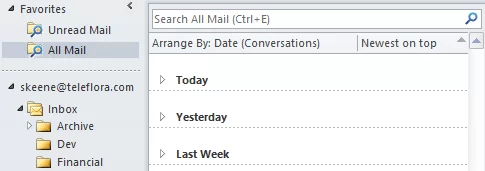
Bring Gmail-style workflow to Outlook
Among the top features called out by any gmail fan is the archive button, which acts as a simple dismissal of a message. Archiving removes an entire email conversation thread from your inbox, while keeping it accessible under all mail, or any number of labels. It’s an extremely efficient hybrid method between piling and filing, because it rescues the user from obsessive organizing, and later, searching… ‘where did I put that message from the boss, his folder or the one for the project… hmm’. Today I’d like to share how I’ve setup my Microsoft Outlook inbox to behave similarly to Gmail. While…
-
Boost Windows Search in Two Steps
Many of even the most infrequent of Internet users has experienced instant searches by now, where search suggestions (or even full results) appear live while you type, before you even press Enter. It seems like magic, searching the entire world as fast as you can type. But did you know your Windows PC has the same power?
-
Create personalized bookmarks in SharePoint
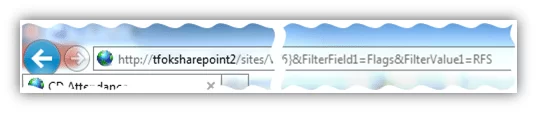
You might already be familiar with the filter bar, the gray headers at the top of most SharePoint lists. This interactive header allows you to sort and filter your view to drill down to the information you’re seeking. Sure, you could set your filter every time you visit the page, but that’s tedius if you need the same information each day. Here’s the ninja way: First, visit the list once and set your filters as you normally do one last time. As you set your filters, you might notice that the address of the webpage changes: Above: When setting the…
-
Speed up your computer with eye candy?
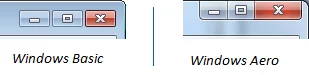
Has your computer ever re-drawn the screen slowly? Or has a lagging program ever turned black or duplicated itself like this as you try to drag it around? You can alleviate these slow-downs and even prevent GDI driver-mode related crashes by using Windows Aero, available in Windows Home Premium and higher editions. You can tell if Aero is on by looking at the top of almost any window. If the window controls (known as caption buttons) are touching the edge, you’re using Aero. It’s a subtle indicator, but it’s there: The Aero design also has translucent effects, like real glass…
-
Be more Conversational with your Email
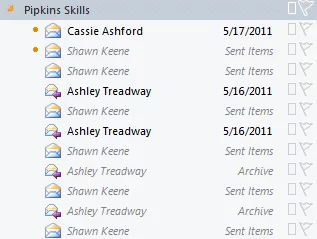
Tip: Use Conversation view in Outlook to find related messages from other foldersYou save: About an hour a week Have you ever received a reply to an email and wanted to look at the other messages in the chain? What if the other messages were already moved into other folders? Or if you wanted to look at messages you sent? In the dark ages, finding all these related emails required digging though folder after folder, hoping you weren’t missing any. In the middle ages, there was search. Neatly tucked away in the right-click menu was this option: This was handy, but it…